WATER TANK FULL (Portable AC)
Cause
Water Tank is full of water.
Solution
Manually empty water tank.
Cause
Float Switch Defect
Solution
If there is no water in the tank and the code is displaying the float switch circuit needs to be tested
Check for breaks in harness between Main PCB and Float Switch.
Check for physical issues/obstructions around float.
Note: Float Switch Circuit reads Normally Closed.
DETAILS BELOW:
WATER TANK FULL (Portable AC)
– The water tank will fill up faster in areas with higher humidity as part of the air conditioners job is to remove moisture from the air. Also, if the unit is being used in Dry Mode (Dehumidification Mode) it should be expected for the tank to fill faster.
– The unit has a slinger blade on the condenser fan and attempts to evaporate as much water as possible, but the above conditions are often too much for the unit to overcome causing the code to display.
Emptying the Water Collection Tank
When the internal water collection tank is full, the LED display will show FL / P2 / E5 and the air conditioner will turn off until the tank is emptied.
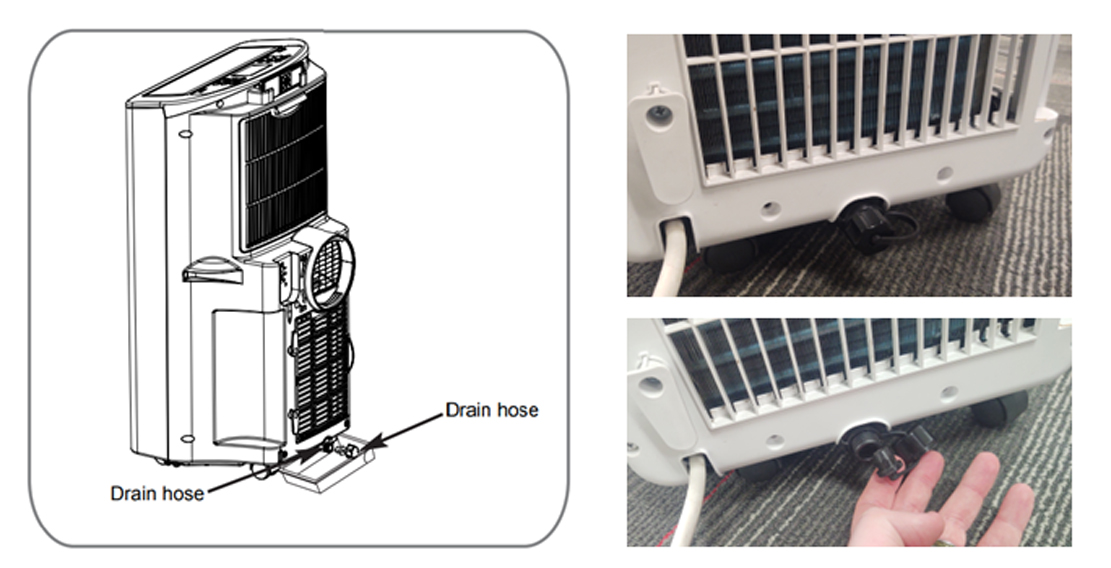
• Unplug the air conditioner, disconnect the exhaust hose from the back, and move the air conditioner to a suitable drain location or outdoors. You may also place a pan under the drain that will hold up to 2 pints of water.
• Remove the drain cap from the drain outlet.
• Once the water collection tank is drained, reinstall the drain cap, making sure it is on securely.
• Place the air conditioner in the desired location, reconnect the exhaust hose, and plug in the air conditioner
If the code is displayed and there is NO WATER in the tank….
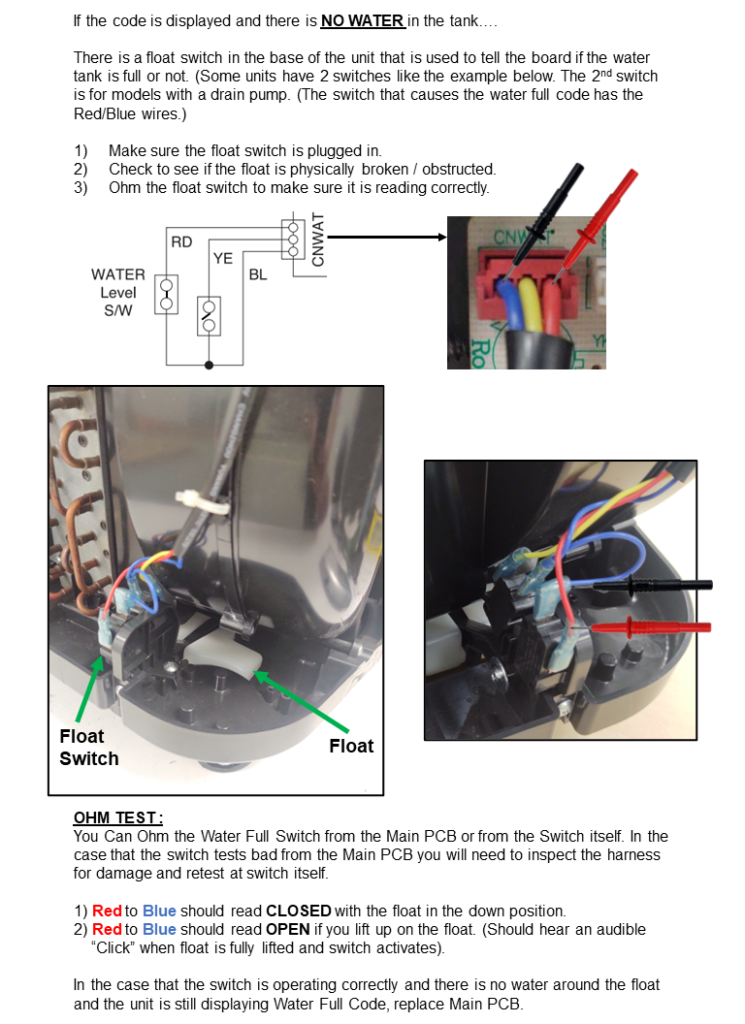
There is a float switch in the base of the unit that is used to tell the board if the water tank is full or not. (Some units have 2 switches like the example below. The 2nd switch is for models with a drain pump. (The switch that causes the water full code has the Red/Blue wires.)
Make sure the float switch is plugged in.
Check to see if the float is physically broken / obstructed.
Ohm the float switch to make sure it is reading correctly.
OHM TEST :
You Can Ohm the Water Full Switch from the Main PCB or from the Switch itself. In the case that the switch tests bad from the Main PCB you will need to inspect the harness for damage and retest at switch itself.
1) Red to Blue should read CLOSED with the float in the down position.
2) Red to Blue should read OPEN if you lift up on the float. (Should hear an audible “Click” when float is fully lifted and switch activates).
In the case that the switch is operating correctly and there is no water around the float and the unit is still displaying Water Full Code, replace Main PCB.